
 Dev
Devteamplay Data Storage manages the activities that are related to the central long-term storage of the teamplay digital health platform. The teamplay Data Storage bases on Azure Cosmos DB, a very flexible and customizable database service of Microsoft, and the most current features of Azure blob storage services.
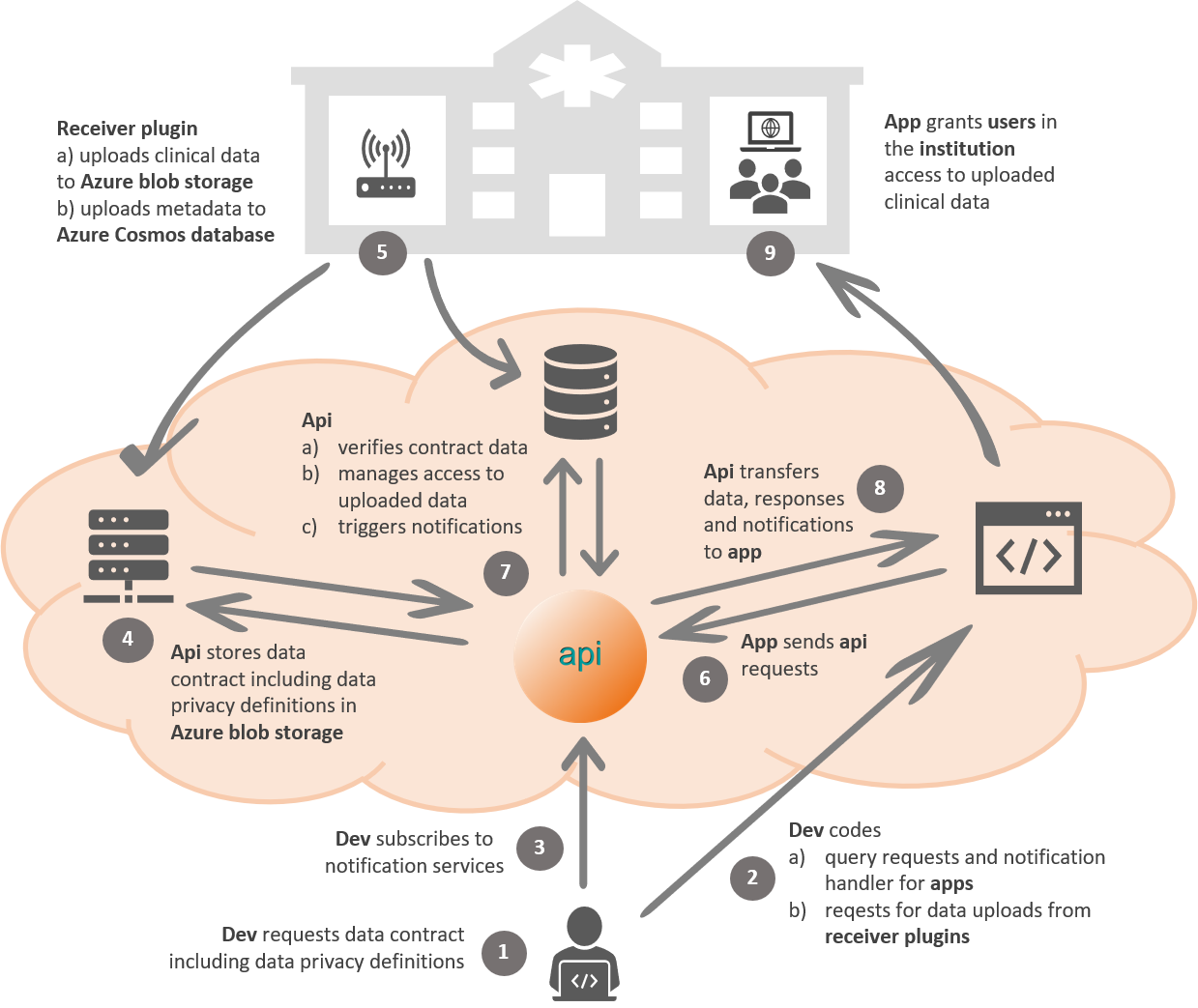
Image: teamplay Data Storage - API workflow example
### Question regarding the image above: Are the data contracts and the data privacy definitions be really stored in Azure Blob Storage and/or in the Azure contract DB? ###
Cloud storage often serves as a content source for browser and mobile applications. This is typically achieved using application-issued, pre-authorized URLs which provide time-limited access directly to specific content without requiring a service to proxy this access.
With the help of Azure Storage, teamplay Data Storage supports this pattern through the use of shared access signature tokens (SAS tokens). These tokens grant specific, time-limited access to storage objects by signing an authorization statement using the storage account access key, which is controlled by account administrators. While this approach provides the required limited access to clients, it sometimes represents an over-provisioning of access to these token-issuing services since this provides full control over the entire account where they may only require read access to specific content.
teamplay Data Storage - Upload of data
teamplay Data Storage - Search for Data
teamplay Data Storage - Register for Notifications
teamplay Data Storage
Add here the name/link for the related API product (Chlorine)
The currently available APIs offer and support the following functions:
Upload of data
Requesting the creation of data storage platform contracts for private use with individual data privacy criteria
Registering additional data privacy definitions as an amendment for an existing data storage platform contract
Allowing authenticated access to private or shared data in the teamplay Data Storage
Uploading of unstructured or partially unstructured data such as DICOM data, PDF, mpg files, etc.
##What kind of files can be actually been uploaded? Does the file types correspond to the supported file types for Azure blob storage or are they further restrictions for the teamplay Data Storage service?
Uploading structured metadata as a base for data queries
## what is the 3rd kind of meta data that can be uploaded with this API (@Mikhail)
Initiating security and verification checks for uploaded data like anti-virus scans
Initiating data privacy checks and if applicable data transformations based on your registered data privacy contracts for uploaded data
Search for data and download of data
Authenticated data access to the teamplay Data Storage
Searching for and downloading of data by passing data queries with the API request
Metadata-based search
Downloading of single files via temporary links from the response body
Triggering bulk downloads with zipped files
Register for notifications
Subscriptions to notification services on dedicated database events
In the API gallery, see the details of the "teamplay User Notifications - Register and Send" API
For registering your partner application and for subscribing to an API product, follow the instructions on the Sign-up page
Prerequisites for utilizing the related APIs and services are:
General
Your application has been registered for an integration with teamplay digital health platform.
You have already active API subscriptions for the required teamplay Data Storage products.
Upload data
x
Search for data and download of data
x
Register for notifications
x
For Siemens Healthineers employees, as an alternative to the offered API operation, you can also request a new platform data contract for the teamplay Data Repository or register an amendment for additional data privacy definitions via the Siemens Healthineers website in the intranet.
xxx
xx
xxx
xx
xxx

--------------- go to the top of this article --------------->>