
 Dev
Devteamplay Images APIs (API product)
In this article, you get an introduction about teamplay Images APIs.
teamplay Images offers you an imaging platform. This imaging platform is a vital part of the teamplay digital health platform. The teamplay Images APIs enable you to integrate your application into the imaging platform.
With our teamplay Images APIs, we want to enable your applications to optimize the clinical routines of your client institutions and to help adding further value. To achieve this, teamplay Images heavily relies on the DICOM domain model and adheres to imaging standards such as DICOM and DICOMweb. For the future, the connectivity with EMR systems with maturing standards such as FHIR might be supported as well.
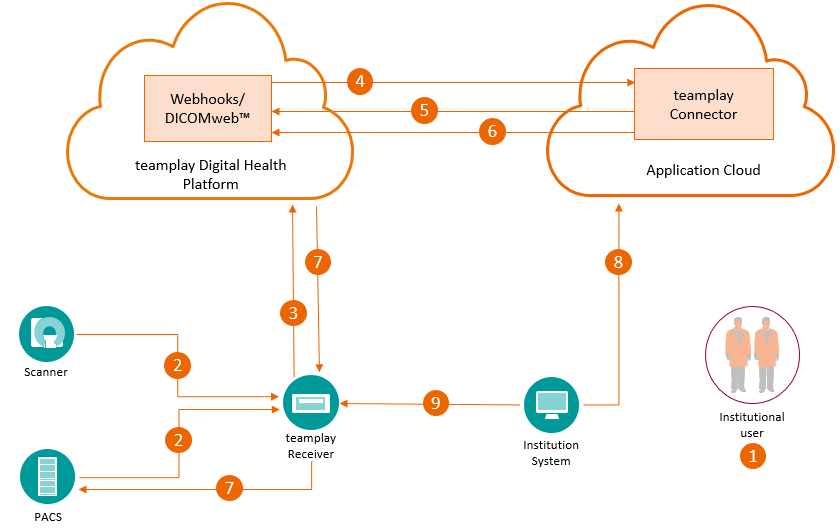
For a seamless integration with our teamplay imaging platform, we follow a standardized clinical data flow that is depicted in the graphic below in form of a teamplay DICOM image round trip.
DICOM (glossary entry)
Details of the teamplay DICOM image round trip:
In the teamplay web portal, the administrator of an institution configures the DICOM AE titles for your application. Based on the DICOM AE titles this administrator also sets up routing rules for routing results from your application to the institution systems.
Local systems such as a PACS system or scanners send DICOM data to the teamplay Receiver by using the configured DICOM AE titles.
In the teamplay Receiver, the image-processing pipeline starts. The image-processing pipeline takes care of data minimization, recording of data for re-identification and the upload of data to the teamplay digital health platform.
The teamplay digital health platform sends out a system notification in form of an http post request (webhook) to your application about the availability of data. As soon as your application has returned a response with an http success status code, the appropriate permissions are granted and the associated data is immediately available for download.
Your application can download the data from the teamplay DICOMweb APIs and can start the postprocessing.
Your application pushes the results back to the teamplay DICOMweb API, which triggers the automatic routing.
The teamplay Receiver downloads the results, performs the re-identification, and routes the re-identified data to the institution systems, which are configured in advance.
An institutional user opens your web application from the institutional network.
Your application accesses the re-identified data to display it to the clinical user in the GUI.
The standardized clinical data flow on which the teamplay Images APIs are based gives you the following benefits and advantages:
One-time setup of the DICOM Imaging round trip for each institution. No additional infrastructural changes such as firewall adaptions are necessary when the institution purchases additional imaging applications.
Central configuration management of the DICOM interfaces on the teamplay Receiver.
Central configuration management of the DICOM systems to interact with teamplay Images.
teamplay Images (associated APIs)
Accessing DICOM data from an institution. Data might have also undergone minimization in advance. Configuring the public encryption key to encrypt predefined DICOM Tags for data minimization purposes.
Getting notifications about the availability of DICOM data from an institution.
Downloading DICOM data for advanced postprocessing.
Marking DICOM instances for postprocessing completion to support storage commitment with devices in the institution.
Querying DICOM metadata for several purposes such as:
Visualizing DICOM study metadata on the user interface
Filtering out DICOM data for downloading
Uploading results from postprocessing and routing the results to an institution. Supported results from postprocessing can be, for example:
DICOM secondary captures
DICOM segmentation
Reports such as a DICOM embedded PDF
Re-identifying minimized DICOM data with its original values in the institutional network. Re-identification could happen during the routing of results or your application can proactively request for re-identification of selected DICOM studies. Re-identification is done using APIs on the teamplay Receiver at the institution.
teamplay Images API (API product)
Options to invoke your cloud applications (article)
Data centers and regions supported by the teamplay digital health platform (article)
Before an institution can access their DICOM data through your application, the following prerequisites apply:
You need to subscribe to the teamplay Images API product and integrate the associated APIs in your application.
The teamplay Receiver must be installed and configured on the institution site.
The institution must have the entitlement (license) for teamplay Images.
In the teamplay web portal, the administrator of an institution must have configured the DICOM AE titles for your application. Based on the DICOM AE titles this administrator also must set up routing rules for routing results from your application to the institution systems.
Integration with teamplay Images involves the integration of teamplay backend services and the teamplay portal GUI integration.
Integration with teamplay is required for each deployment based on your target market. This could be a one-to-one or many-to-one mapping.
teamplay Images APIs (API product)
Refer to the associated APIs.
Refer to the associated APIs.
Refer to the associated APIs.
Products & services: teamplay Images (Siemens Healthineers)
With the currently available APIs and your web application, you could support use cases such as:
Allow clinicians to quickly access and view studies on their desktop or tablet.
Allow clinicians to easily access the postprocessing results on their routine workstations.

--------------- go to the top of this article --------------->>