
 Dev
Devteamplay Fleet webpages (Siemens Healthineers)
teamplay Fleet Portal (Siemens Healthineers)
In this article, you get an introduction about the teamplay Fleet Connect APIs.
With ongoing consolidations, you as a healthcare provider face the challenge of managing a continuously growing fleet of medical devices. In order to be able to assess your equipment performance and make confident decisions holistically, you need to have access to real-time data in one place to decide on the required actions. However, in many cases the data you need for this is not easily or quickly available, either scattered across different data sources or simply outdated, which requires a lot of time and manual effort from you to get the transparency and data quality you need.
teamplay Fleet Connect is a teamplay Fleet Enterprise solution that enables you to streamline the management of your fleet from Siemens Healthineers. teamplay Fleet Connect allows you to optimize your asset performance through confident, data-driven decisions in your service management software solution.
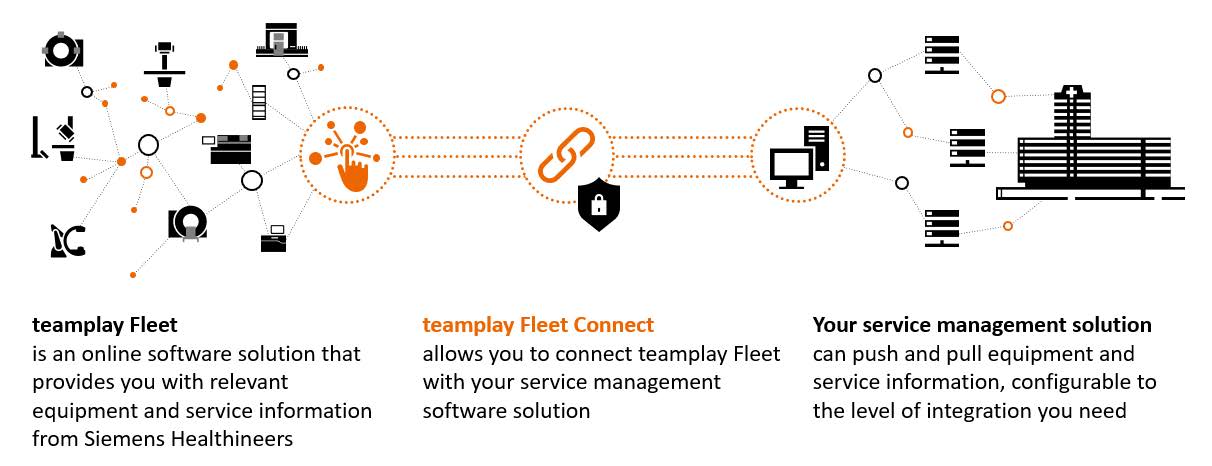
By connecting or sharing the equipment and service data with selected healthcare service management software solutions that is configurable to the level of integration, you need, you can benefit from the teamplay Fleet Connect APIs the following.
Increase your data transparency and save time by having up-to-date equipment as well as service-related information across your institutions available in your service management system.
Improve your data quality and reliability as the essential basis to empower faster and more confident data-driven decision-making.
Enhance your operational efficiency by avoiding non-value adding as well as manual data maintenance activities through automated data synchronization and integration with the Siemens Healthineers service processes.
Please note that a separate agreement with Siemens Healthineers might be required to use teamplay Fleet Connect. Please contact your local Siemens Healthineers organization for more information.
teamplay Fleet Connect FIT (API products)
teamplay Fleet Connect MAX (API products)
teamplay Fleet Connect enables you to connect your institution’s service management software with teamplay Fleet to exchange equipment and service information. To meet your needs, teamplay Fleet Connect is available in two bundles.
teamplay Fleet Connect FIT
teamplay Fleet Connect FIT offers you an essential set of Application Programming Interfaces (APIs) to connect your institution's service management software with teamplay Fleet, configurable to the level of integration you need.
teamplay Fleet Connect MAX
teamplay Fleet Connect MAX offers you an extensive set of standardized Application Programming Interfaces (APIs) to connect your institution's service management software with teamplay Fleet, aiming for complete integration to achieve one holistic overview.
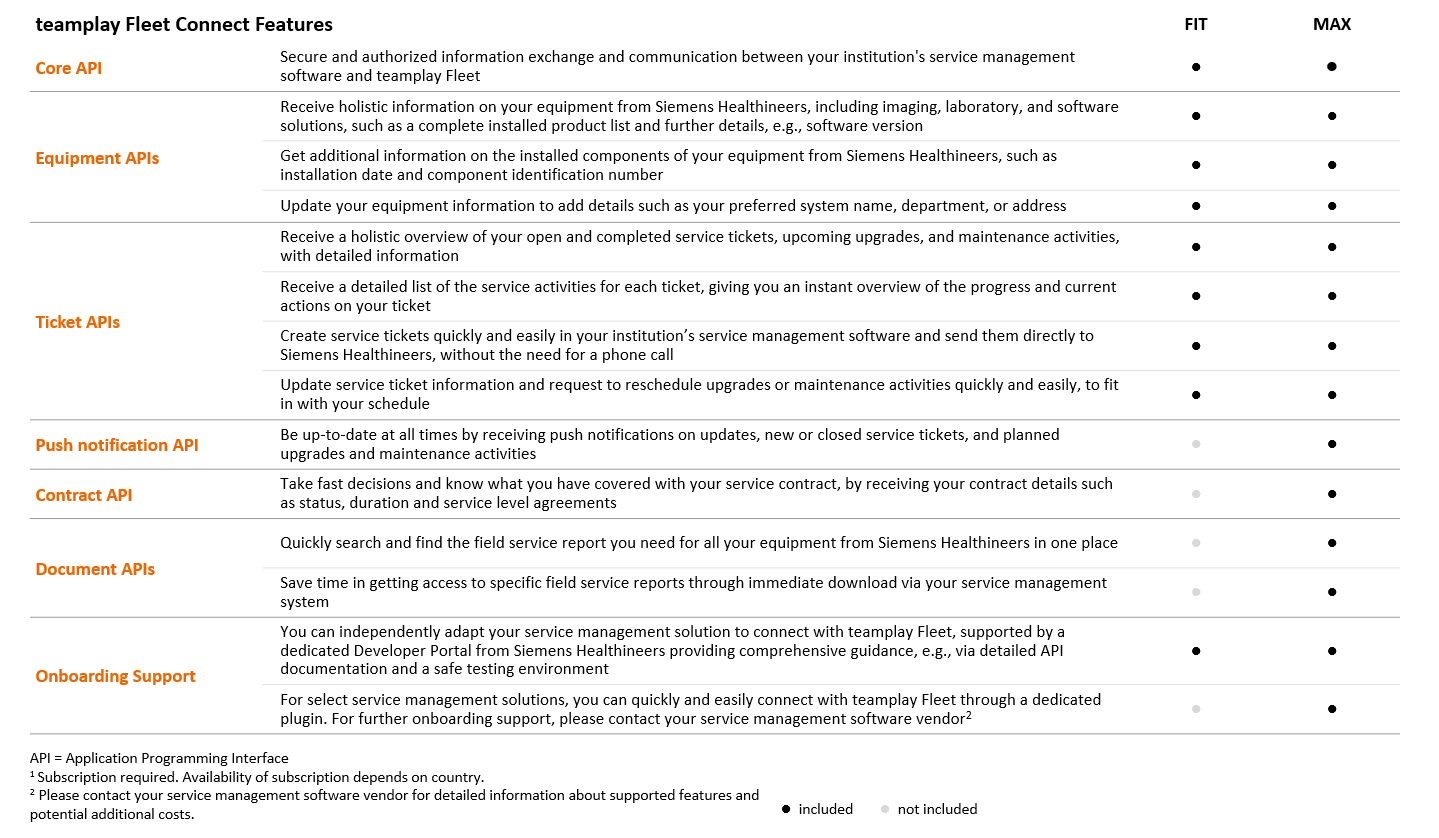
The following prerequisites apply.
You have received the following teamplay Fleet Connect credentials in the course of the onboarding activities:
Subscription key
Your subscription key is created on bundle level and provides access to the APIs of teamplay Fleet Connect FIT or teamplay Fleet Connect MAX. Subscription keys are unique – you will receive one for the test and one for the production environment.
Client ID
The client ID identifies the clinical institution and therefore its corresponding equipment and service data. The Client ID is valid for the test and production environments.
Client Secret
A client secret is created for each client ID. The secret is only known by the clinical institution and the authorization server. The same secret applies to the test and production environment.
You are able to integrate the teamplay Fleet Connect APIs in your application by
calling our REST APIs via the Internet and our defined URLs using OAuth 2.0 Bearer tokens for authorization.
consuming the information provided via JSON format by our REST APIs and consistently storing the information on your end.
embedding our teamplay Fleet Connect API suite into your application and its supported processes in a way that actors of your application can easily and efficiently initiate sending information to Siemens Healthineers and are also made effectively aware of received information and updates from Siemens Healthineers.
providing an endpoint on your end to which we can send our push notifications via the Internet. This needs to be considered only by teamplay Fleet Connect MAX customers.
The following utilization steps apply.
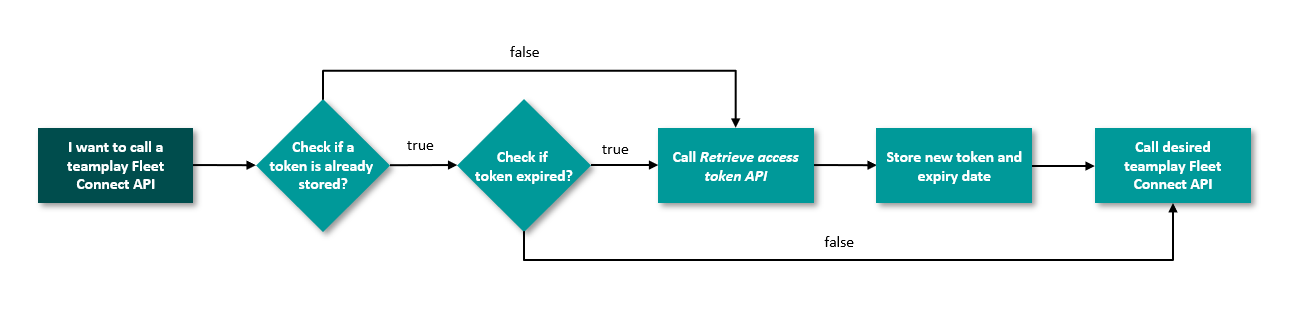
Get a valid access token, which is required to authenticate for any of the other teamplay Fleet Connect APIs by calling our teamplay Fleet Connect Core – Access Token API by providing your credentials:
Subscription key
Client ID
Client secret
To successfully call the teamplay Fleet Connect APIs, also provide the following parameters:
Subscription key
Client ID
teamplay Fleet Connect token
Access token to authorize your request that can be received from the teamplay Fleet Connect Access Token API.
In the authorization section, set the Access Token value in the Authorization section to "No auth".
In the header section, use the teamplay Fleet Connect token as input for Authorization that you have received via the teamplay Fleet Connect Core - Access Token API and add the prefix „Bearer“.
In the header section, provide your Client ID.
In the header section, remove Simulate-Response-Code in case you want to retrieve real testing data.
In the header section, provide your Subscription key.
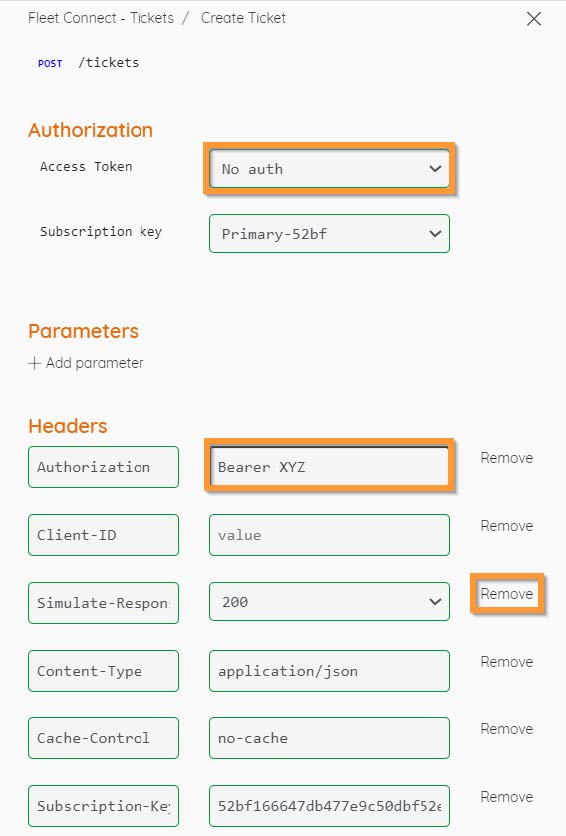
teamplay Fleet Connect APIs are accessible through the following environments:
Sandbox Europe (West)
A test environment accessible via our Sandbox Developer Portal that is connected to our test systems and can be used for developing and testing.
Production Europe (West)
A production environment Europe (West) accessible via our Developer Portal that is connected to our global productive systems and that is supposed to be used only for productive mode.
Irrespective of the geographical region where your clinical institution is located, teamplay Fleet Connect APIs are currently only accessible through the sandbox and production Europe (West) environments.
For the URLs of the API endpoints, refer to the dedicated API details pages of the required API environment.
To switch your deployments from the test to production environment, apply the following steps:
Ensure that your application is working properly and has been tested on your end. If you need any assistance, contact your teamplay Fleet Connect Country Admin from Siemens Healthineers.
Use the API URLs from the production environment.
Use your Subscription key for the production environment.
Your client ID and secret are the same for test and production environments.
teamplay Fleet Connect FIT APIs (API products)
teamplay Fleet Connect MAX APIs (API products)
Refer to the descriptions of the associated APIs.
Links to the supported portal environments (references)
Irrespective of the geographical region where your clinical institution is located, teamplay Fleet Connect APIs are currently only accessible through the sandbox and production Europe (West) environments.
Moreover, refer to the descriptions of the associated APIs to see potential limitations and restrictions on API level.
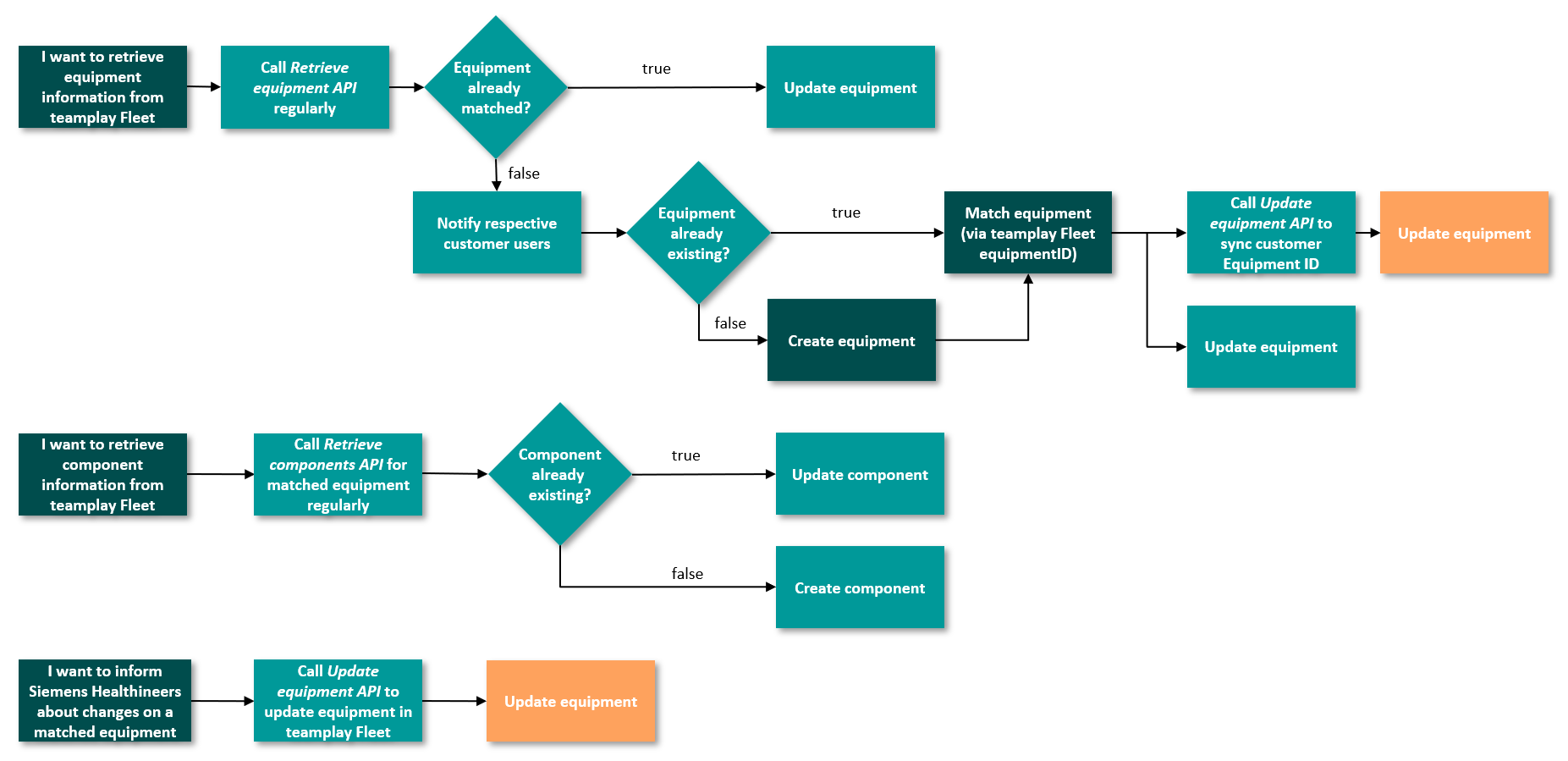
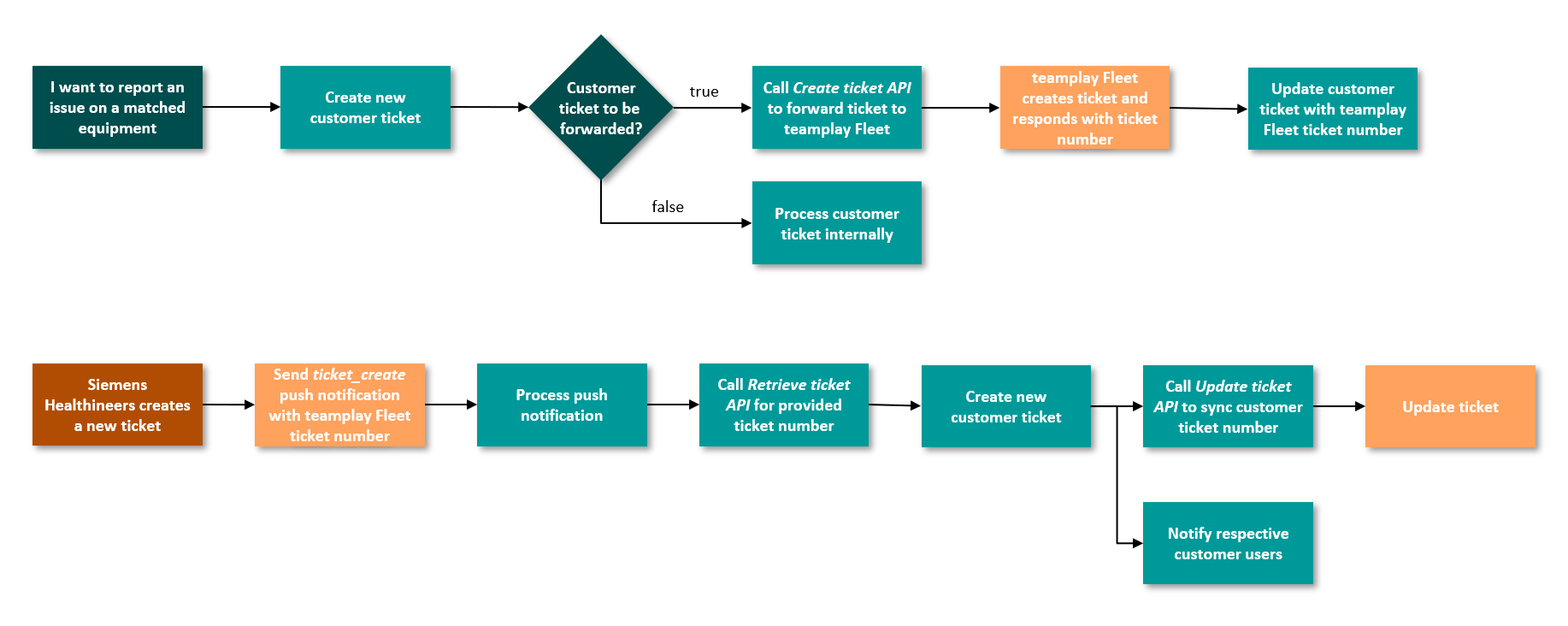
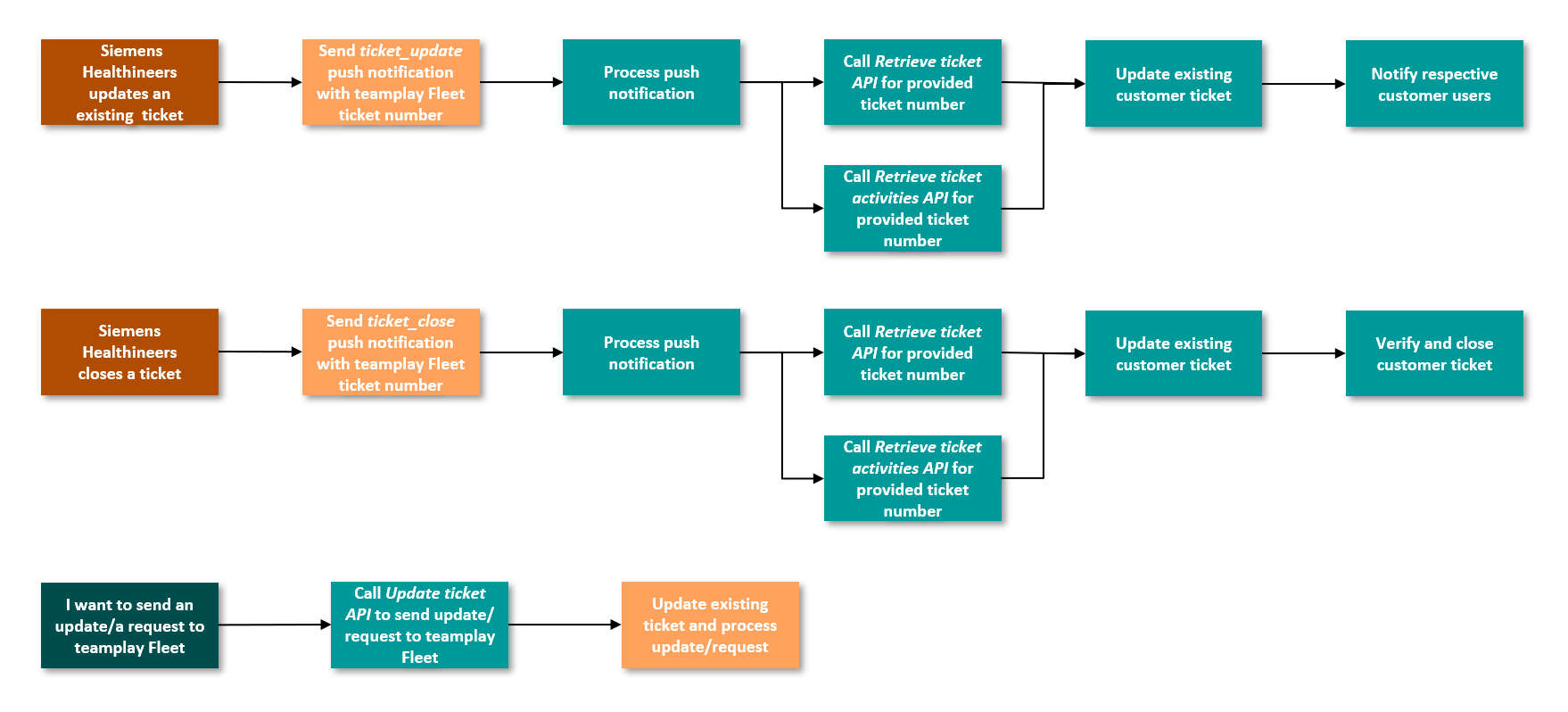
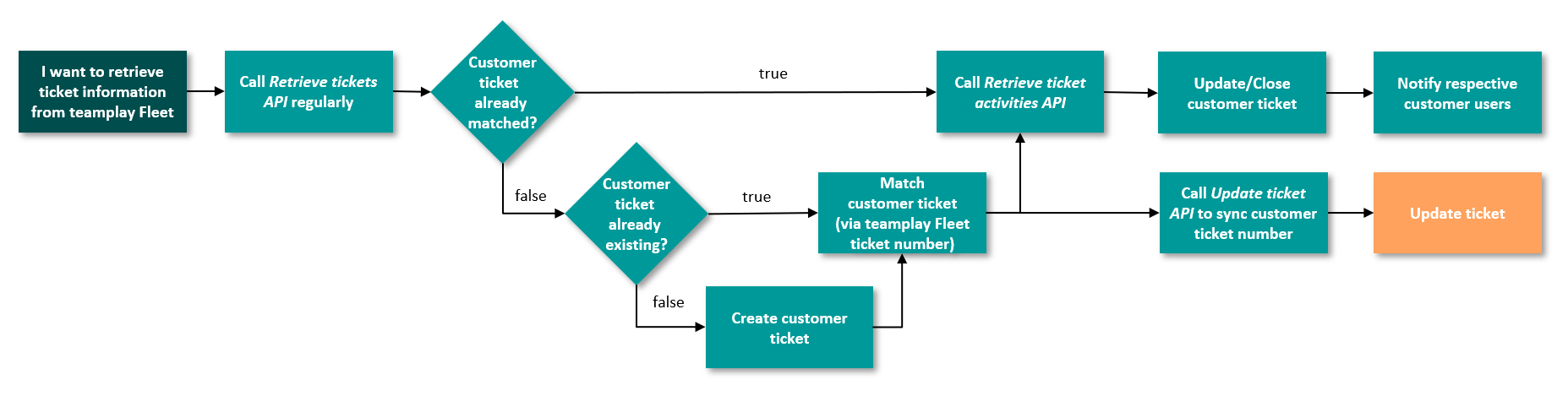
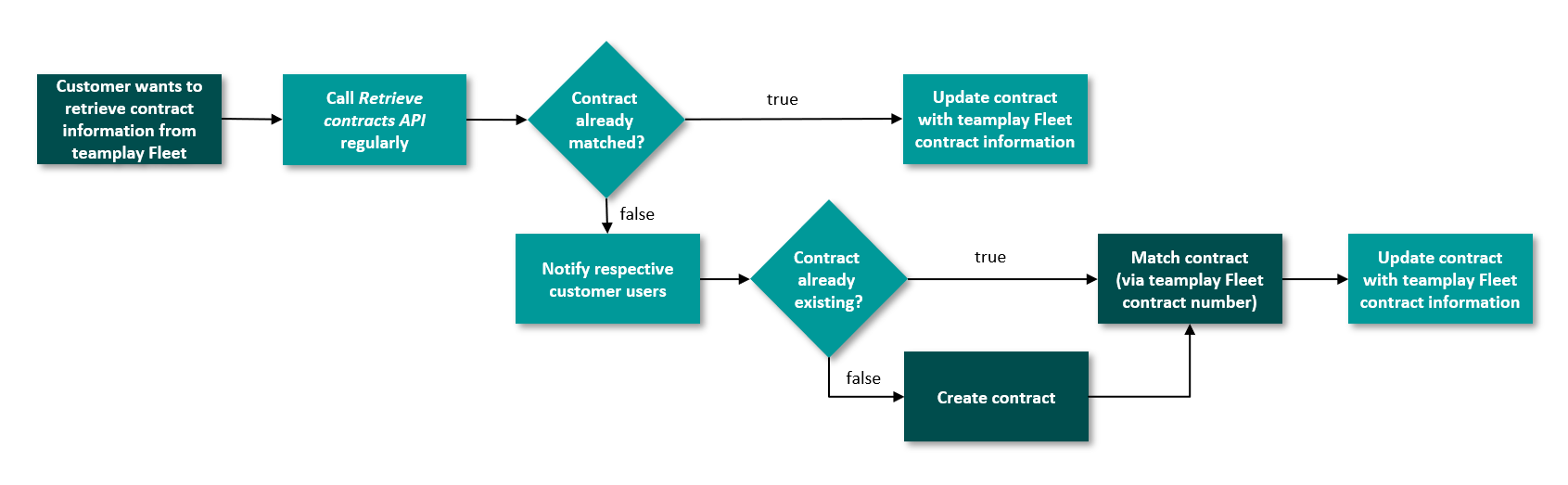
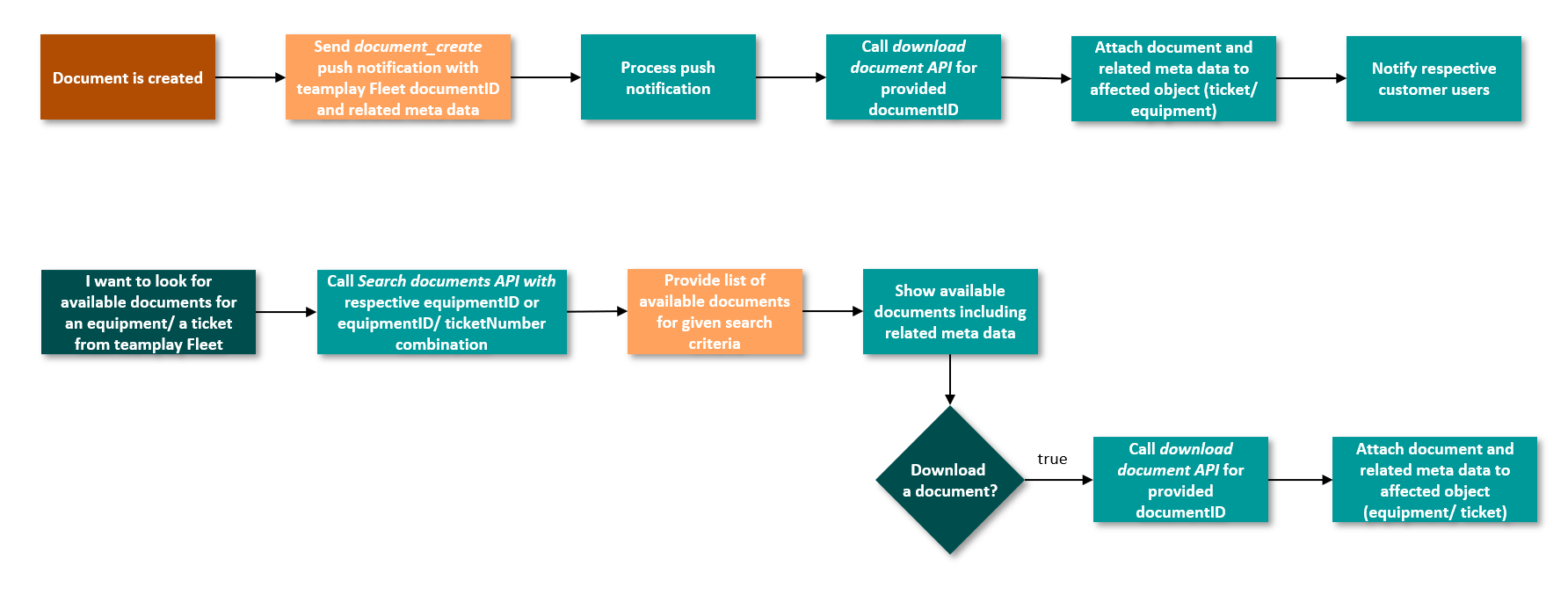
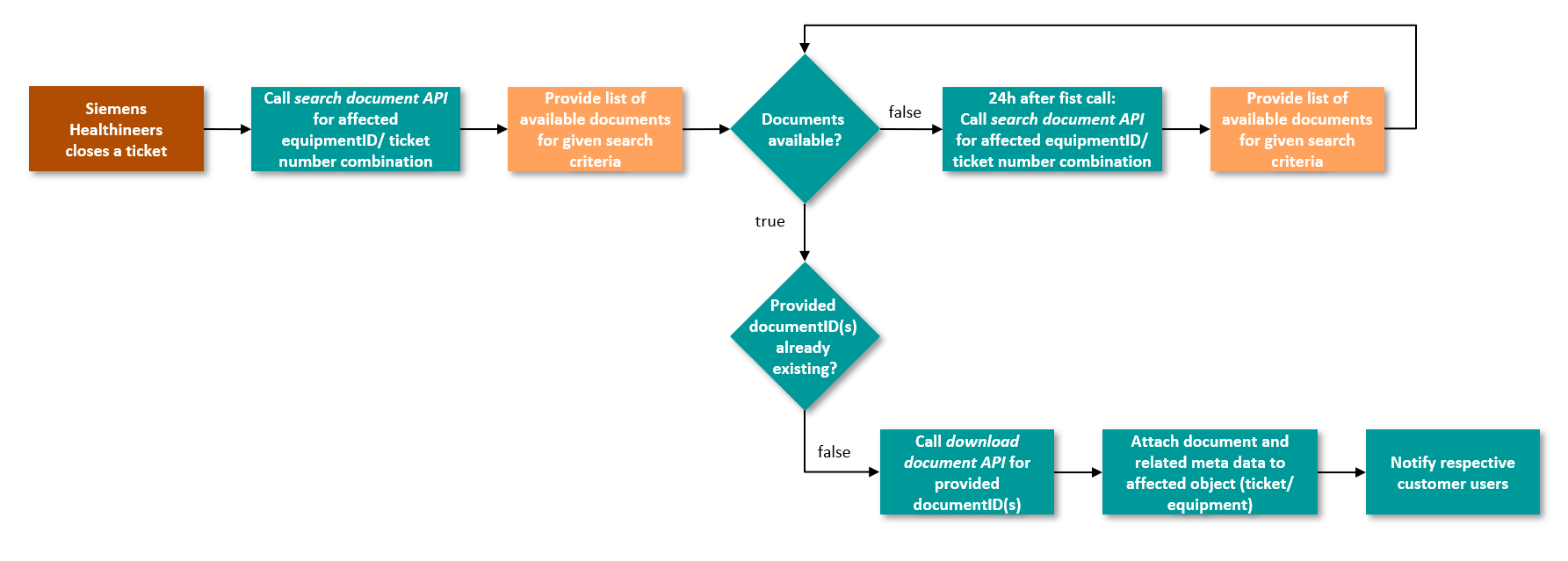
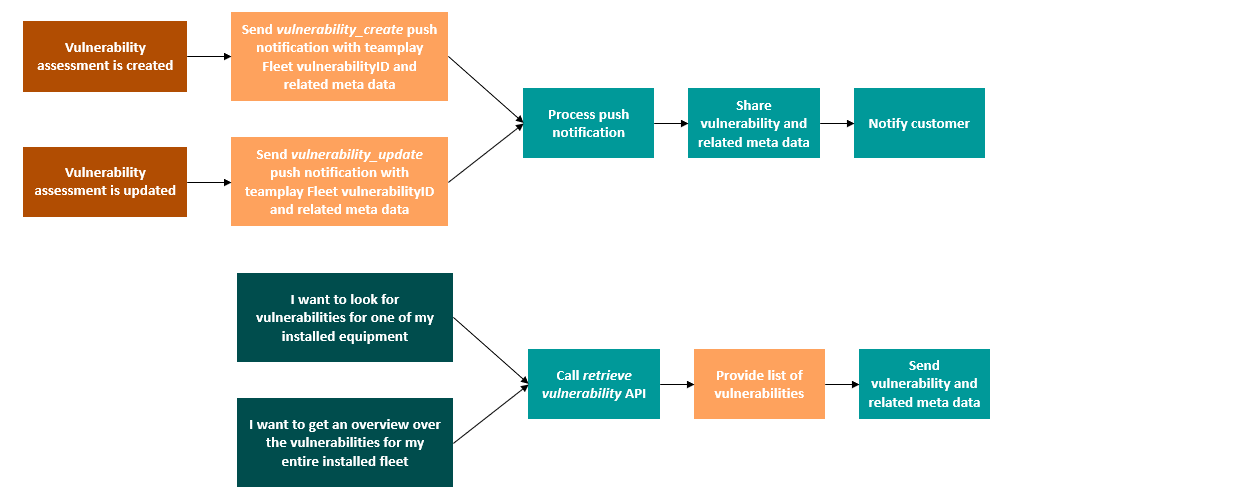
The following illustrations show example scenarios how an integration of your service management software solution with teamplay Fleet Connect could be achieved.
The following flowcharts show general sample processes and require further adaptation to your requirements and the applied service management solution.
CMMS (glossary entry)

--------------- go to the top of this article --------------->>