
 Dev
DevDocs & guidelines > Getting started
Supported types of tokens (article)
Authentication and authorization (article)
teamplay Base APIs (API product)
To authorize your API requests, our APIs support different kinds of tokens. For machine-to-machine communication scenarios without a user context, an application token is mostly required to authorize your API requests.
Before you can generate application tokens, you need to register your application for the desired teamplay environment. The registration process differs for cloud and on-premises/on-edge applications.
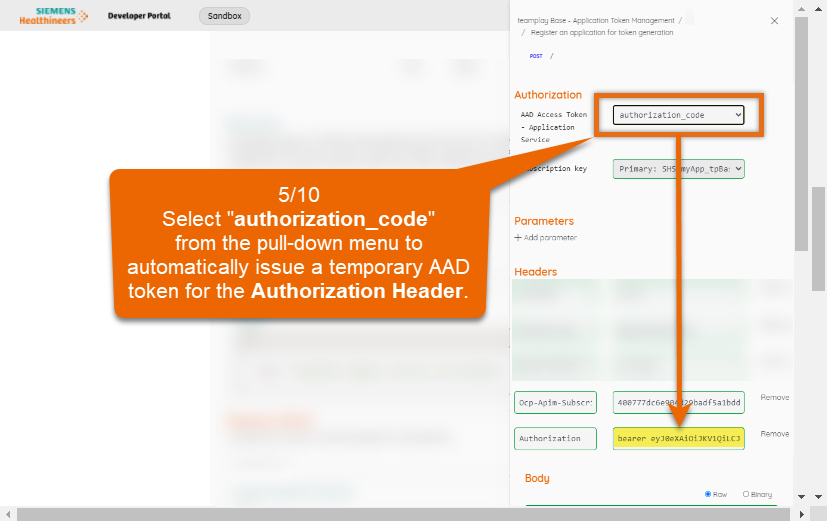
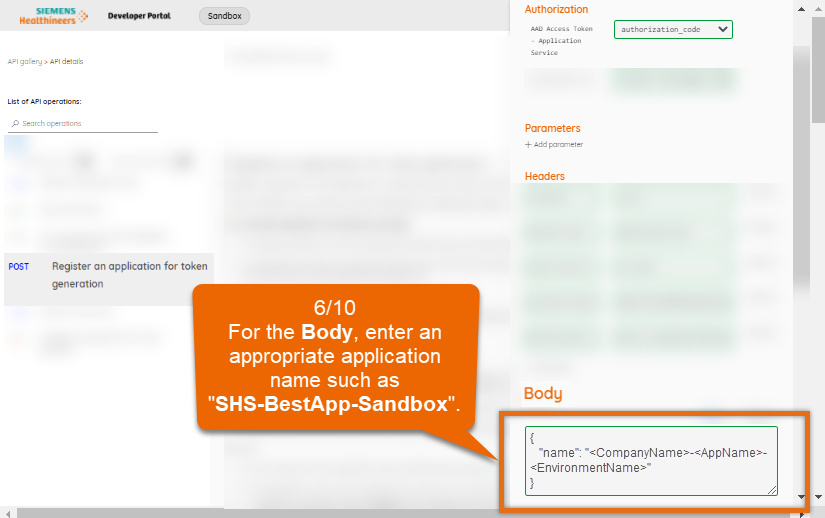
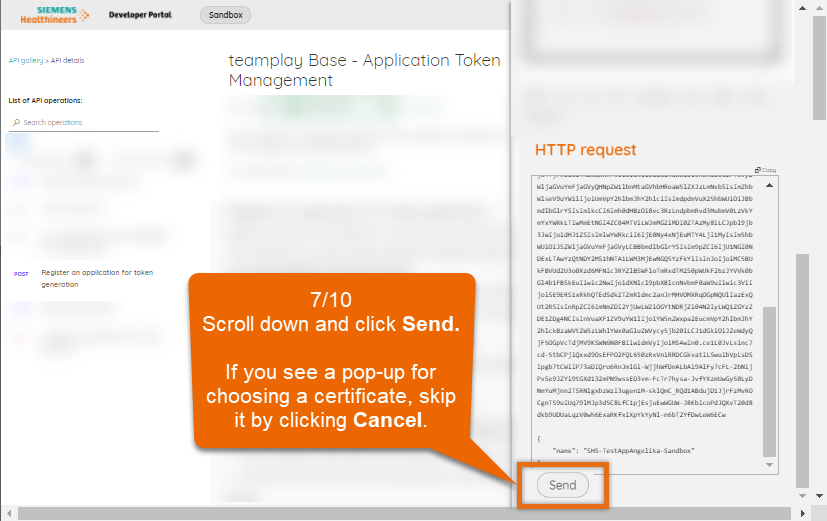
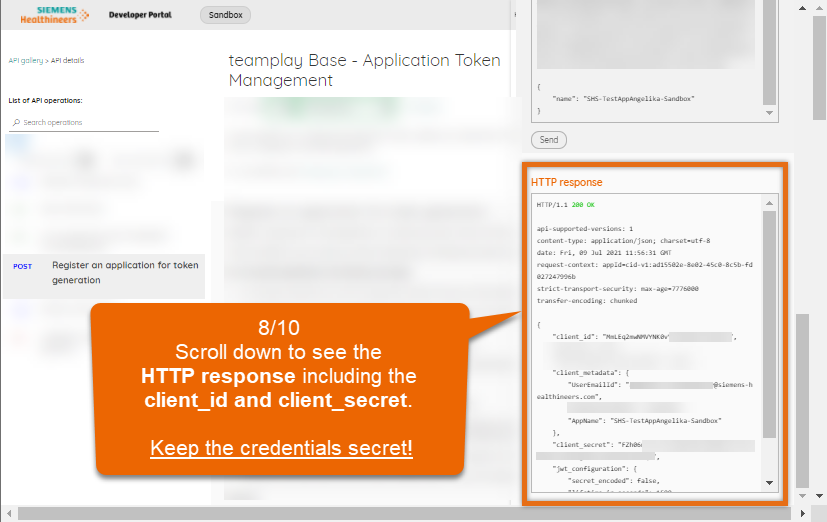
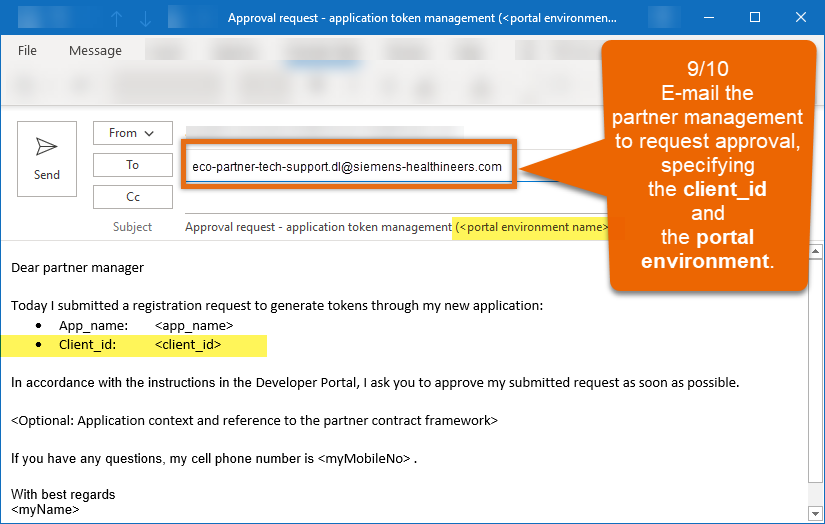
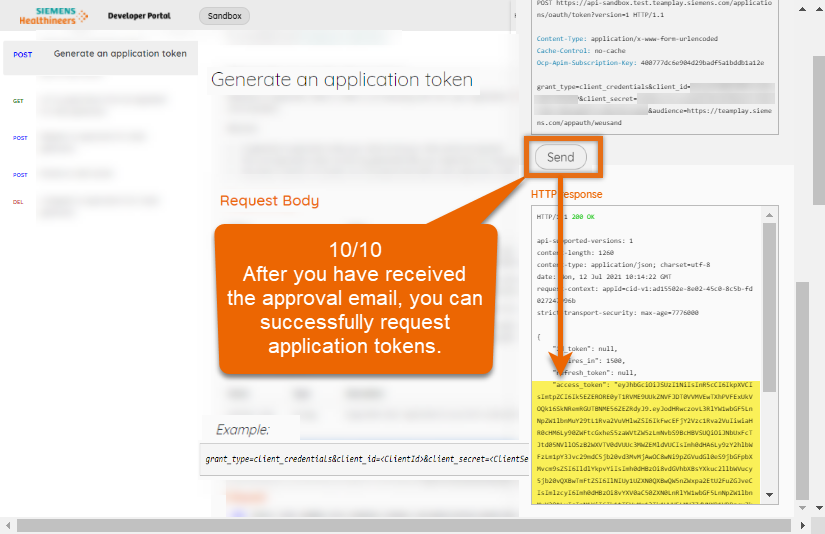
Watch this demo to see how to register your cloud application for token generation and how to get the approval as an external business partner.
Subscribing to API products (article)
teamplay Base APIs (API product)
Partner management details (Sign-up page)

Subscribing to API product (article)
teamplay Base APIs (API product)
Links to supported teamplay environments (article)
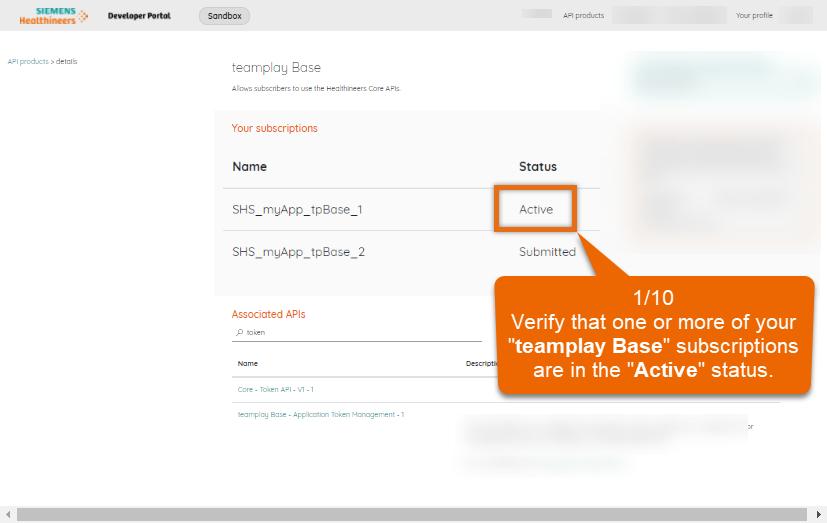
For registering cloud applications for token generation, manually perform the following steps:
Log into this portal with your functional developer AAD account.
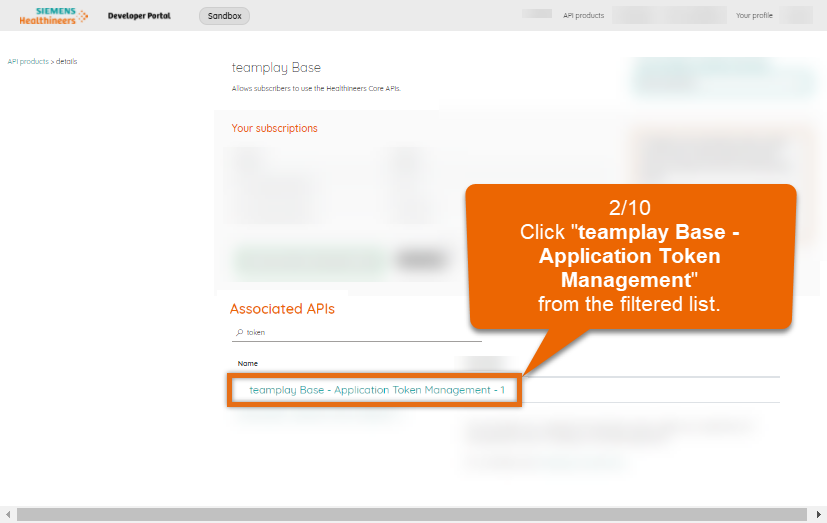
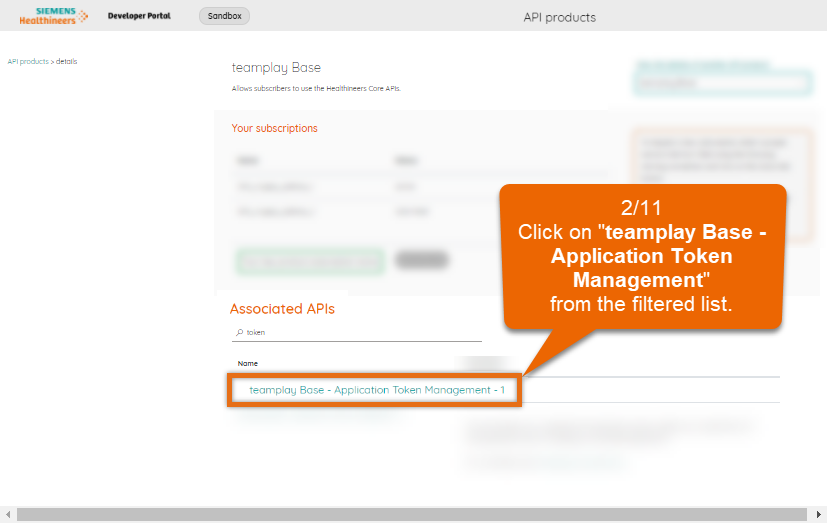
In the API gallery in this portal, filter for and select the teamplay Base - Application Token Management API.
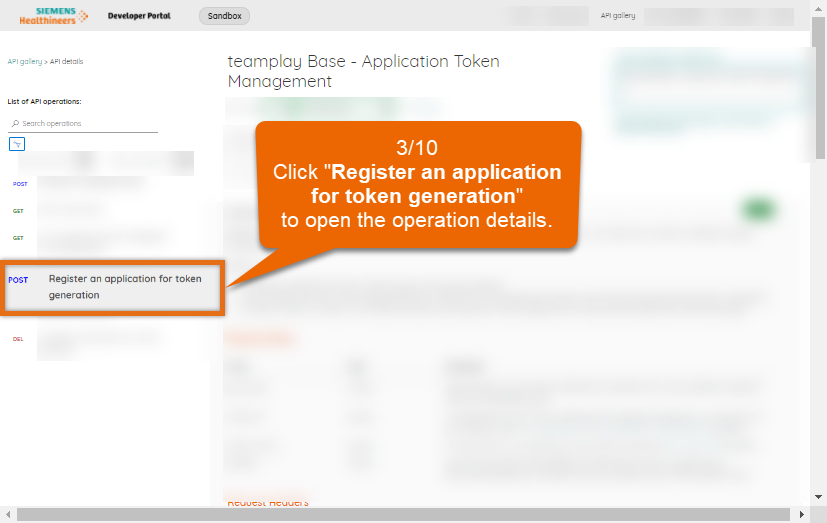
On the API details page, select the Register your application for token generation operation from the List of operations on the left.
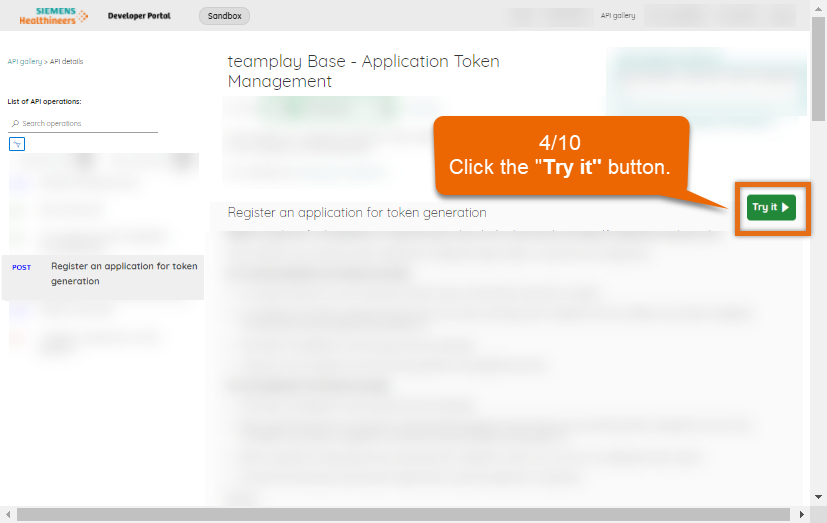
Click the Try it button and submit your registration request as shown on the demo slides above.
For the app_name, apply the naming convention "<companyName>_<appName>_<environmentName>", for example, "SHS_myBestCloudApp_Sandbox".
<companyName>:
Short name of the company that is the owner of the application such as "SHS" for Siemens Healthineers. A consistent spelling of the prefix of your application identifier helps to administer application identifiers and to keep your code consistent.
<appName>:
Valid application name that is unique within your company. If you support both, cloud and on-premise applications, also mention the deployment type such as "myBestCloudApp".
<environmentName>:
Short name of the teamplay environment as displayed in the header of this portal such as "Sandbox" for the standard sandbox environment. For the sandbox environment in China, you could use the environment name "SandboxCn".
For getting the approval for an already submitted registration request, you must perform the following step depending on your role:
for external business partners, follow the instructions shown in the demo above and see the details on the Sign-up page on how to contact the partner management for this purpose.
for Siemens Healthineers employees, raise a ticket from the Get Help section of the Sharp ServicePort and select the service "teamplay". In your ticket, also mention the associated client ID, application name, the portal environment name and optionally the intended purpose of your application.
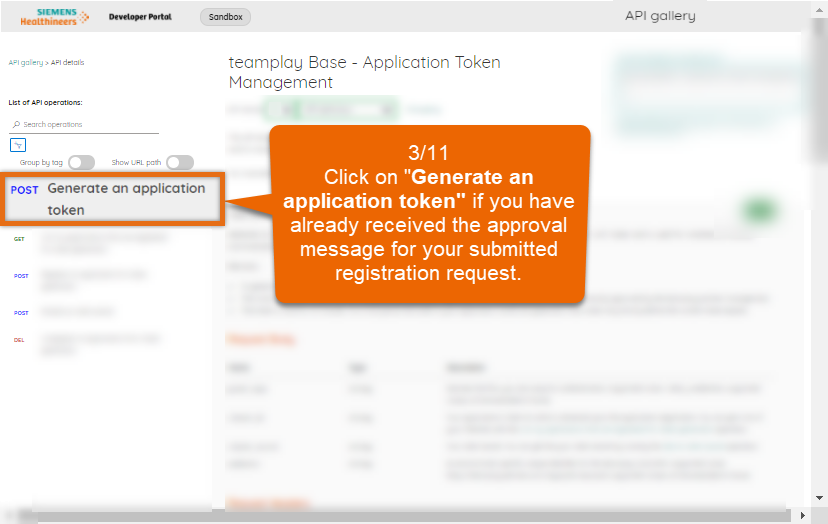
Wait until you receive a message from Siemens Healthineers that your request has been manually approved for the affected teamplay/portal environments. To additionally verify if your registration request has been already approved, you can log in to the Developer Portal with your functional account and test for each requested environment through the "teamplay Base - Application Token Management" API if generating application tokens properly works.
After successfully registering your application for token generation, we recommend to store the client secret in your application-specific key vault and update the configuration file for your application with the client ID and the reference to the client secret accordingly.
Partner management details (Sign-up page)
Sharp ServicePort (SHS-internal ticket tool)
There are several MANUAL steps that you cannot automate yet and that need to be performed for each application and teamplay environment separately.
We recommend to register your application early enough, especially for production environments, to avoid unwanted delays.
For cloud applications, make sure that you log in with your functional developer account when registering your application to allow other team mates to access the application credential for token generation.
Your received client credentials are secrets. Therefore, never expose them to an unauthorized audience. Additionally, never request nor pass application tokens from your application front-end. Instead, only pass credentials from your application backend.
For security reasons, rotate your client secret for your application frequently or when necessary. The rotation of the client secret is explicitly designed as a manual process step that is only carried out via this portal GUI.
teamplay portal (login)
Unlike cloud applications, you require a teamplay user token of a teamplay user with administrator rights to authorize your API request to register on-premises or on edge applications for token generation. The institution's administrator needs to login to the teamplay portal through an Internet Browser to issue an initial user token for a new teamplay session. before deploying and installing new on-premise or on-edge applications on their local network environment to authorize the registration for token generation using their teamplay user token.
Links to Developer Portals for the different teamplay environments (article)
Managing your subscriptions (article)
teamplay Base (API product details view)
For registering on-premise or on-edge applications, perform the following steps:
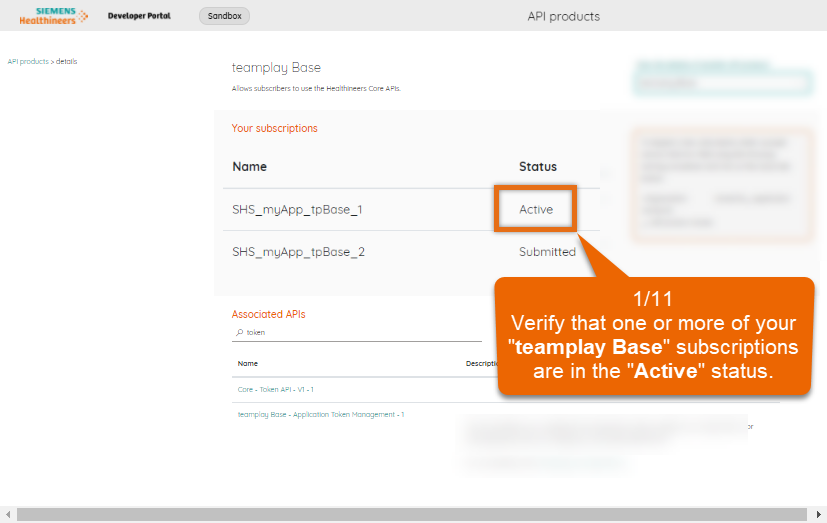
1. Ensure that you have an active subscription for the API product teamplay Base of the desired teamplay sandbox or production environment.
2. Get a valid teamplay user token from the currently logged in teamplay user with administrator rights.
3. Authenticate users that are currently logged-in to your application using their teamplay user token.
4. Register your application for token generation by calling the associated API operation of the teamplay Base - Application Token Management API in the cloud. Pass the teamplay user token and your primary subscription to authorize your request. If your API request was successful, the registration is automatically approved.
For further details, see the documentation of the teamplay Base - Application Token Management API on the API details page. For on-edge applications, follow the same instructions as for on-premises applications.
5. From the API response, store the client ID and client secret from Auth0 in your local key vault.
The received client credentials are required for issuing teamplay on-premises application token. On the teamplay digital health platform, there are several APIs requiring this kind of application token for authorization.
To allow your on-premise or on-edge application consuming teamplay Base - Application Token Management APIs in the cloud, the required request URLs must be whitelisted in the firewall settings of the local network where your application is running in advance.
For further details on how to register on-premise applications, refer to the descriptions of the "teamplay Base - Application Token Management" API.
Supported types of tokens (article)
After you successfully registered your application and after your registration request has been approved, you are ready to generate application tokens.
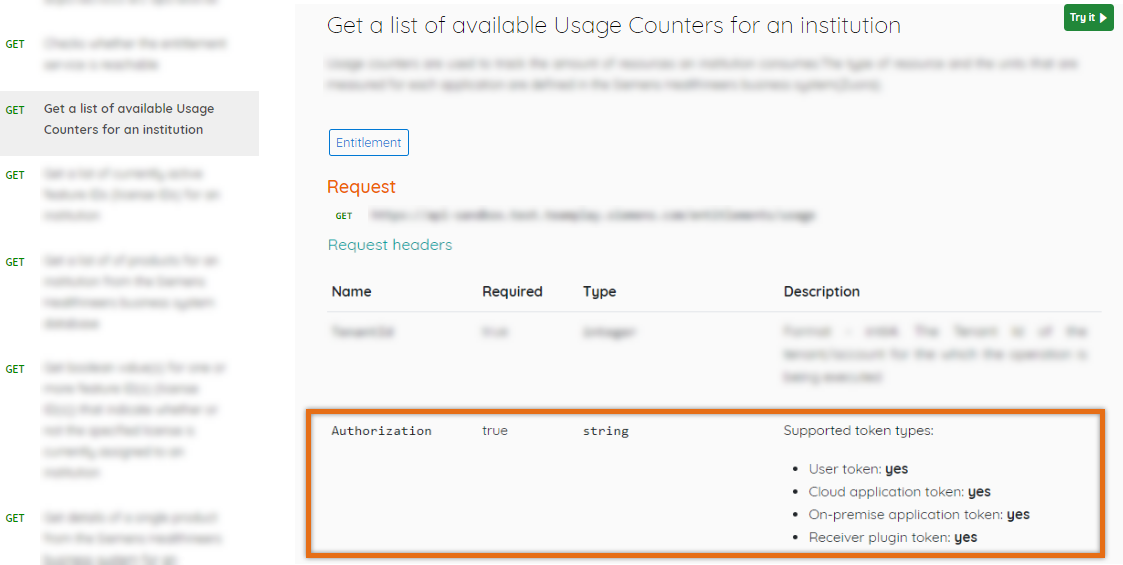
Our different API operations support different types of tokens for consumption such as cloud application tokens, on-premise application tokens or user tokens.
Find the list with the token types that are supported for a dedicated API operation
You can find a list of supported types of tokens in the description of the Authorization header for the selected API operation on the API details page as shown in the following image.
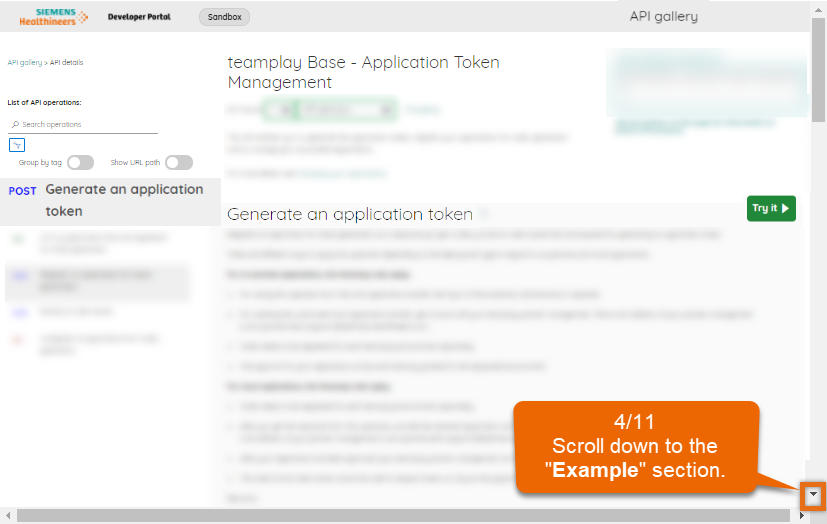
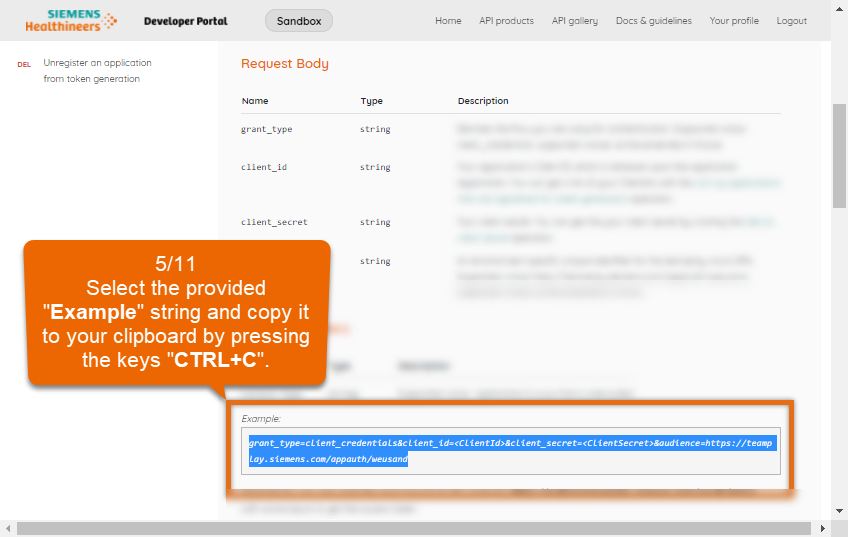
Watch this demo to see how to generate an application token for an already registered cloud application through the Developer Portal GUI.
Subscribing to API products (article)
teamplay Base APIs (API product)
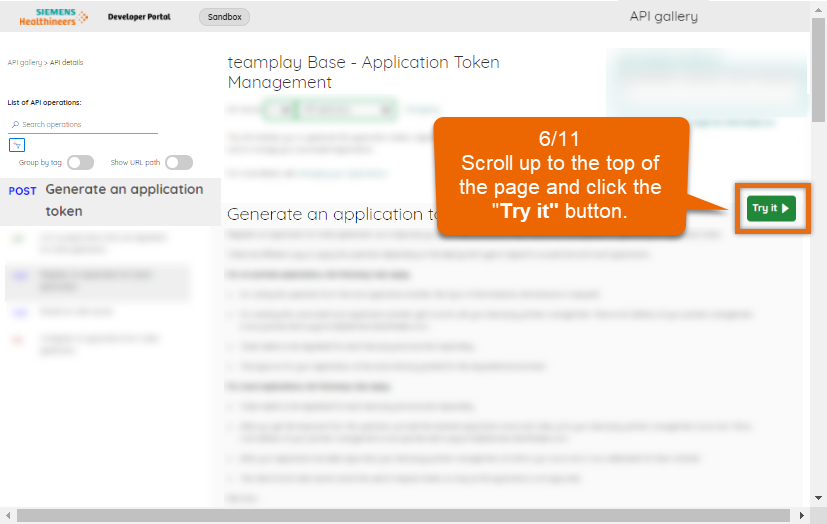
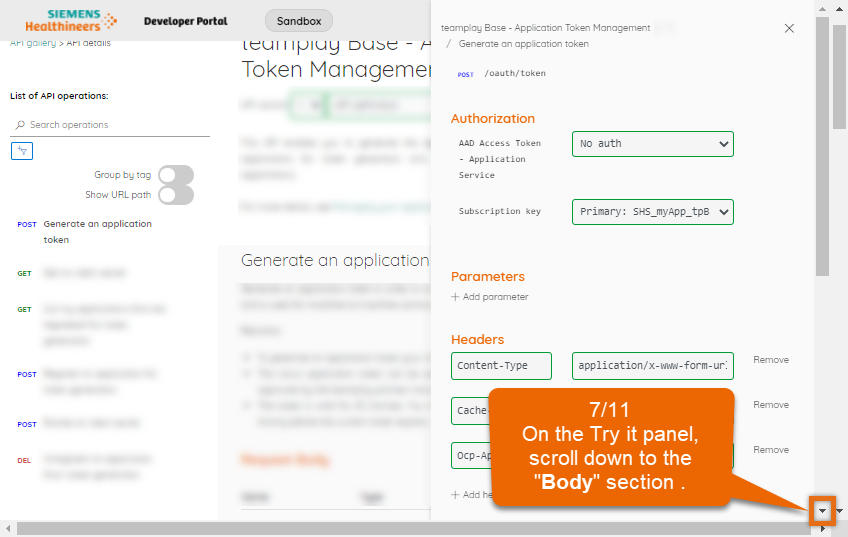
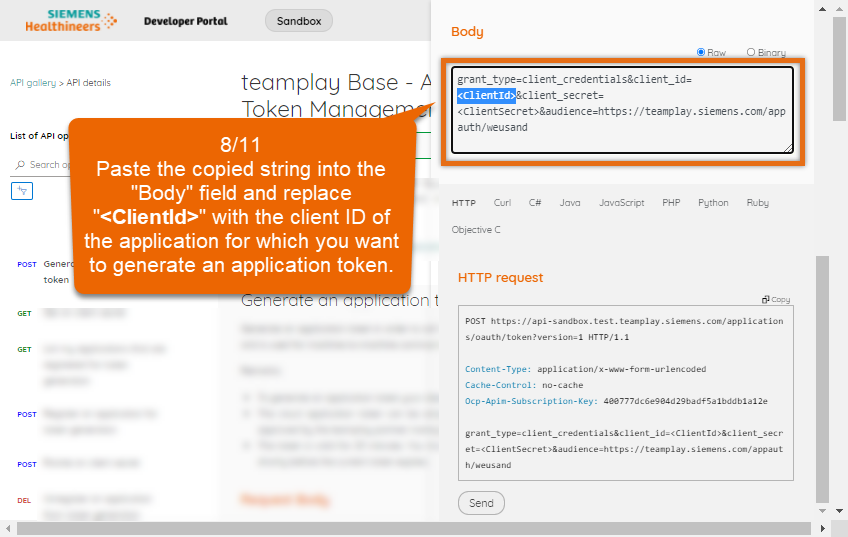
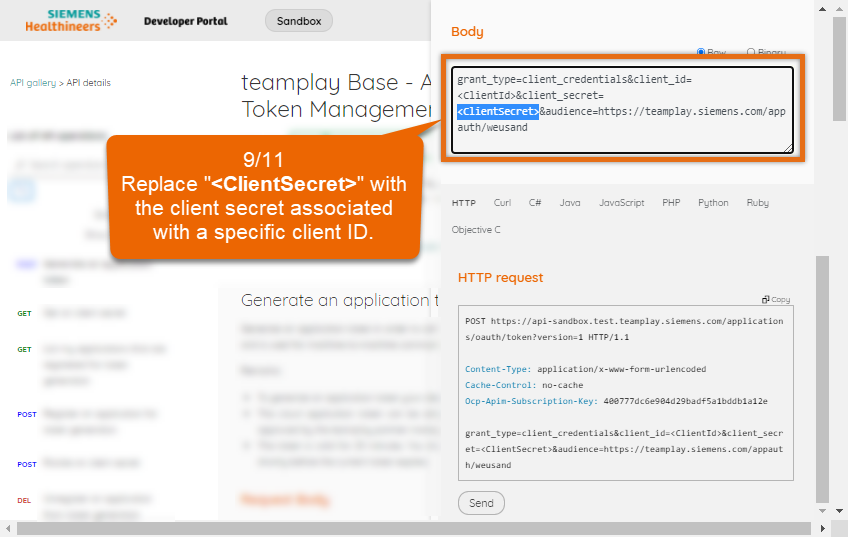
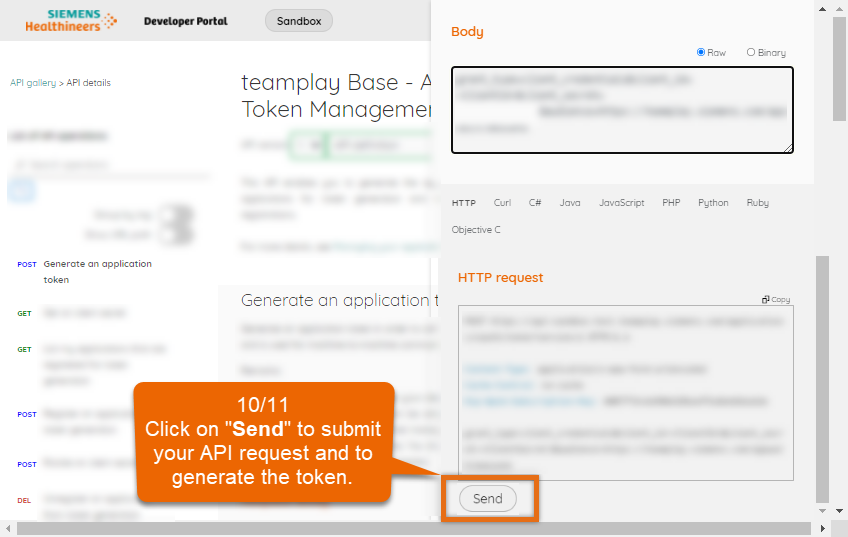
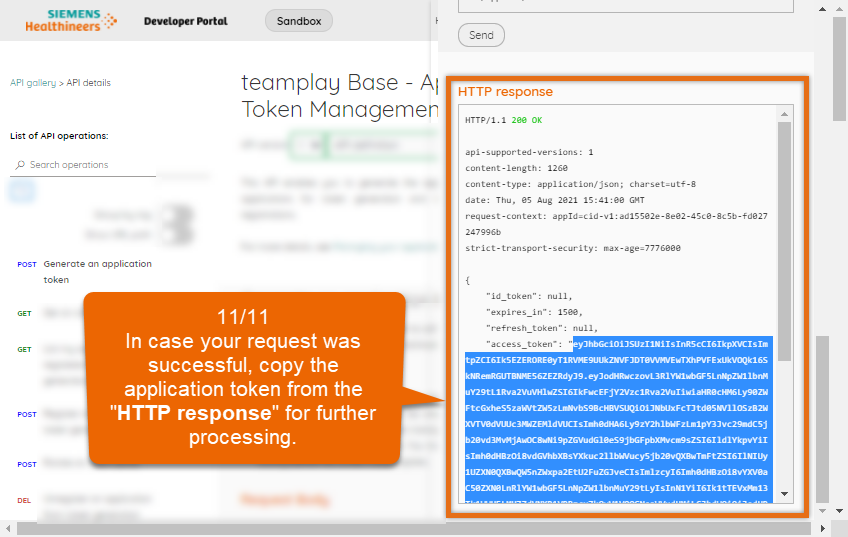
Types of supported tokens (article)
Application tokens and subscription keys are secrets. Therefore, never expose the token to an unauthorized audience. Additionally, never request nor pass application tokens from your application front-end. Instead, only pass application tokens from your application backend.
For further details on how to generate application tokens on demand, refer to the descriptions of the "teamplay Base - Application Token Management" API.
teamplay Base APIs (API product)
You can also manage your registered applications with the "teamplay Base - Application Token Management" API by applying operations such as the following:
List my registered applications
Get a list of my registered applications. Getting the list of registered applications is explicitly designed as a manual process step that is only carried out via this portal GUI. The list of registered applications contains details such as the following:
Client ID
Application Name
Get the client secret
Get the client secret and further details for an application registration by providing dedicated client ID. Getting the client secret is explicitly designed as a manual and separate process step that is only carried out via this portal GUI.
Rotate my client secret
For security reasons, rotate your client secret for your application frequently or when necessary. The rotation of the client secret is explicitly designed as a manual process step that is only carried out via this portal GUI.
Unregister my application
Remove registrations that are no longer required in order to avoid a misuse of your client credentials. After unregistering, no application tokens cannot be generated for the same client IDs anymore. Be aware that there is no undo option for the unregister step. When trying to register the same application again, a new client ID will be created.
Management of applications is performed for each portal environment and for each user ID separately.
For more details about associated operations, refer to the descriptions of the "teamplay Base - Application Token Management" API in this portal.

--------------- go to the top of this article --------------->>