
 Dev
DevThere are different types of tokens that are supported by the teamplay APIs.
Token-based authentication (glossary entry)
JWT (glossary entry)
OAuth (glossary entry)
OpenID Connect (glossary entry)
Authentication (glossary entry)
Authorization (glossary entry)
The way your application is set up and the context of consuming our APIs affects the type of tokens you need to handle.
General types of tokens:
ID tokens
Identity tokens are used to authenticate the users of your application in an interactive user logon scenario. The ID token is referred to as a user token on the teamplay digital health platform.
Access Tokens
Access tokens are used to authorize your API requests in a machine-to-machine communication scenario. The access token is referred to as an application token on the teamplay digital health platform.
Refresh Tokens
Refresh tokens to renew ID or access tokens on the teamplay digital health platform. For details on refresh tokens, refer to the descriptions of associated API operations.
Managing application tokens (article)
Depending on the use case and context, consuming the different APIs might require different kinds of tokens.
Tokens are secrets. Therefore, only pass tokens through your application backend.
To authorize API requests, pass the required token through the authorization header.
Validate tokens before passing them through the header of your API requests.
Our different API operations support different types of tokens for consumption such as cloud application tokens, on-premise application tokens or user tokens.
Find the list with the token types that are supported for a dedicated API operation
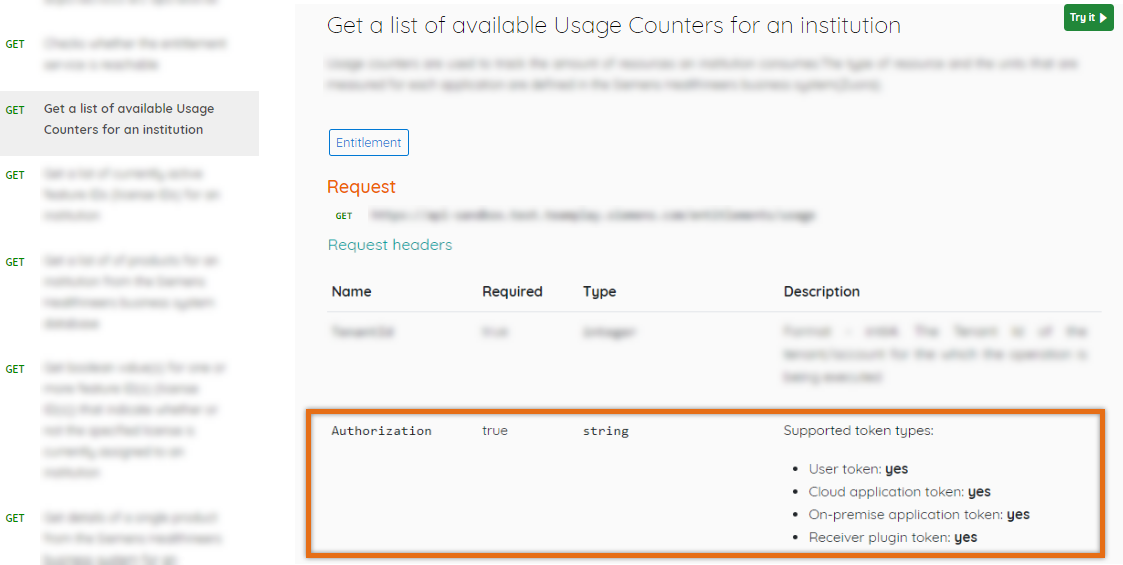
You can find a list of supported types of tokens in the description of the Authorization header for the selected API operation on the API details page as highlighted in the following image.
Properties that apply to this kind of token:
Identity provider (IdP):
OAuth 2.0 authorization server on behalf of Siemens Healthineers or teamplay.
Token type
Identity (ID) token that bases on OpenID Connect specifications.
Token format
The user token is represented as a base64-encoded JSON Web Token (JWT).
Purpose:
The user token is not only used to authenticate the user, but also to authorize dedicated API requests in a user context.
Token generation:
The user token is generated by the authorization server from auth0 on behalf of teamplay or Siemens Healthineers. After a user successfully logged in through the Healthineers single-sign-on (SSO) login page, a user token is generated. For token generation, refer to the article Authenticating your application users.
Token content:
The user token includes information about the user such as the e-mail address. But it also includes additional information for further processing such as certificates.
Expiration time:
25 minutes after issuing
Managing your application tokens (article)
For the teamplay digital health platform, there are two kinds of application tokens for the different application types:
Cloud application tokens
On-premise application tokens
Reducing the data traffic has a huge impact on the overall user experience, especially in regard to the overall system performance. Thus, it is important to keep the number of API calls as low as possible for each teamplay/portal environment.
To minimize the number of API calls, adhere to the following rules:
Whenever possible cache tokens just until their expiration time
Establish a cache mechanism and cache application tokens in order to increase the performance of your application and in order to minimize the data traffic between your application and our services.
Only call the API if necessary
Request a new token only in case of operation processes exceeding the expiration time of the application token. Shortly before an application token expires, request a new application token. Always keep an eye on the number of requests. We recommend writing and reviewing logs regularly. Additionally, avoid calling our APIs in software tests if mocking is possible. Limit API requests to only a few tests on system or acceptance test level and choose their execution frequency carefully.
Generating application tokens (article)
Properties that apply to this kind of token:
Identity provider:
OAuth 2.0 authorization server from Siemens Healthineers.
Token type
Access token.
Token format
The cloud application token is represented as a base64-encoded JSON Web Token (JWT).
Purpose:
To authorize your API requests from your cloud application when the API call isn´t made in the context of user interaction.
Registration for token generation:
Manual approval step
Token generation:
For token generation, refer to the teamplay Base - Application Token Management API.
Expiration time:
25 minutes after issuing
Before you can start generating cloud application tokens, the registration requires a manual approval step.
Plan enough time to ensure that your registration request has been finally approved by your partner management for the requested environment before testing or relying on APIs that require cloud application tokens.
Generating application tokens (article)
Properties that apply to this kind of token:
Identity provider:
OAuth 2.0 authorization server from Siemens Healthineers.
Token type
Access token.
Token format
The on-premise application token is represented as a base64-encoded JSON Web Token (JWT).
Purpose:
To authorize your API requests from your on-premise application when the API call isn´t made in the context of user interaction.
Token generation:
For token generation, refer to the teamplay Base - Application Token Management API.
Expiration time:
25 minutes after issuing
teamplay Receiver APIs (API products)
There are also special tokens that are required in case you´re the owner of a dedicated teamplay Receiver plugin.
Properties that apply to this kind of token:
Identity provider:
teamplay Receiver
Token type:
certificate-based token
Purpose:
Authorizes requests from your Receiver plugin to the associated teamplay Receiver instance.
Token generation:
For token generation, refer to the teamplay Receiver APIs
Expiration time:
25 minutes after issuing
teamplay Fleet Connect APIs (article)
Fleet Connect tokens are required to consume teamplay Fleet Connect APIs. For further information on these tokens, refer to the article about the teamplay Fleet Connect APIs.