
 Dev
DevDICOM (glossary)
teamplay Images APIs (API product)
In this article, we describe the workflow steps for both use cases, query and retrieve of DICOM images.
teamplay portal (login page)

The purpose of query and retrieve DICOM images APIs is to obtain images from remote DICOM servers on the institutional network for storage in the teamplay Data Storage and for use in your cloud-based application. After images have been received and successfully uploaded, they can be directly loaded from the teamplay Data Storage and processed by your application.
General prerequisites
The Images AETs and Privacy tab card in the teamplay Receiver settings of the teamplay portal lists all applications with the associated company logo that an intuition is currently entitled to use. To use the Query and retrieve APIs, the institution administrator must add and configure the DICOM AE titles for your application accordingly. The configured DICOM AE titles will act as DICOM query and retrieve SCUs (Service Class Users). Setting the AETs and adding your application to the list of allowed applications authorizes your application to query and retrieve data from the configured DICOM query and retrieve service providers.
The following illustration depicts how your application users can query and retrieve DICOM images from the configured DICOM query and retrieve service provider.
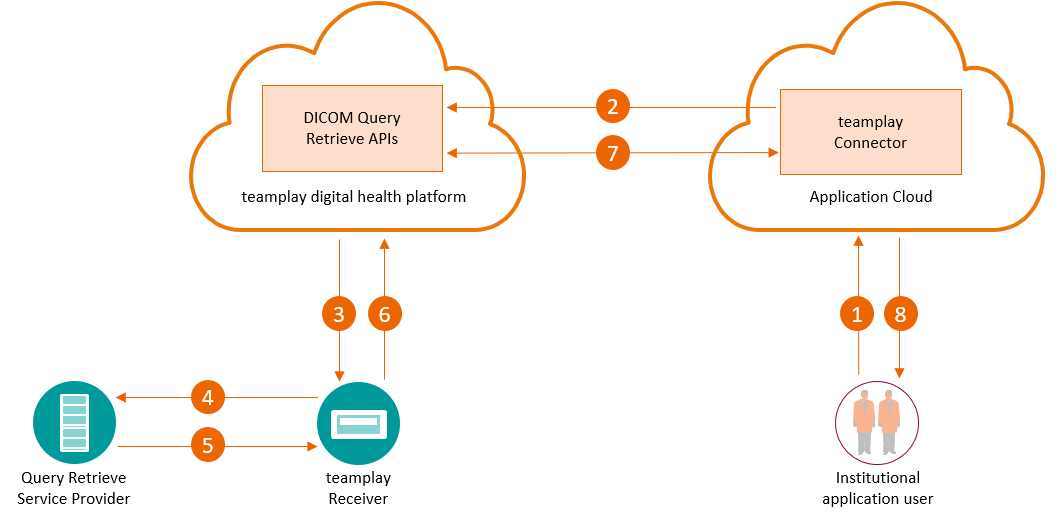
The numbered workflow steps in the illustration above are described for each use case separately.
teamplay Images APIs (API product)
With the teamplay Images APIs, you can query DICOM instances, studies and series against institutional systems such as a PACS. When querying for DICOM images, you actually query the metadata of DICOM images. The query operations base on the standard DICOM method DICOM C-FIND.
The institution administrator can configure several DICOM systems as query service providers. In such a situation, a single query request from your application will be translated to individual sub query operations against each configured institutional system.
To query DICOM data with your cloud application, the following steps apply:
Your currently logged in application user searches for dedicated DICOM data such as studies, series or instances in the intuitional system by entering or selecting the associated criteria.
Your application sends a DICOM query request to the appropriate teamplay Images API.
The teamplay digital health platform authorizes your query request for your application and transfers it to the correct teamplay Receiver instance in the institution.
The teamplay Receiver instance sends a DICOM C-FIND request against the configured DICOM systems.
The query service provider returns the results to the teamplay Receiver instance.
The teamplay Receiver instance uploads the query results to teamplay digital health platform.
Your application sends a request to get the DICOM query request status. If the query results are already available, your application gets additionally the query results with in the response body.
Finally, your application displays the query results to your logged in and authorized users.
teamplay Images APIs (API product)
Your application can retrieve DICOM data from the institutional systems such as PACS. The retrieved DICOM data is sent from the institutional system via AET on the teamplay Receiver instance to the teamplay digital health platform. The retrieve operations base on the standard DICOM method DICOM C-MOVE.
The institution administrator can configure several DICOM systems as retrieve service providers. In such a situation, a single retrieve request from your application will be translated to individual sub query operations against each configured institutional system.
Utilizing services based on webhooks (article)
To retrieve DICOM images with your cloud application, the following steps apply:
Your currently logged in user selects a DICOM study that the application received via a previous DICOM query request.
Your application sends a DICOM retrieve request to the appropriate teamplay Images API.
The teamplay digital health platform authorizes your retrieve request for your application and transfers it to the correct teamplay Receiver instance in the institution.
The teamplay Receiver instance sends a DICOM C-MOVE request against the configured DICOM systems.
The retrieve service provider returns the status of the DICOM data transfer to the teamplay Receiver instance. In parallel, the retrieve service provider sends the requested DICOM images to teamplay Receiver instance.
The teamplay Receiver uploads the retrieve status and the DICOM images to the teamplay digital health platform.
Your application actively requests sending the DICOM retrieve status from the teamplay digital health platform. The teamplay digital health platform sends notifications of series or study uploads, also known as webhooks, to your application. Your application downloads the DICOM data from the teamplay Data Storage. Depending on your use case, your application starts the postprocessing.
The application displays the retrieve results to the logged in user. As soon as all DICOM images are available, depending on the use case, the application user can display or download the DICOM images.

--------------- go to the top of this article --------------->>