
 Dev
DevThis article contains important information for the teamplay sandbox and production environments for the supported regions excluding China. For Chinese environments, only new domain names must be used. For RoW, there is still a little time to plan the migration for your applications running on the teamplay platform.
Legacy domain name support ends soon!
The current domain name *teamplay.siemens.com in teamplay-related URLs changed. The new domain names are:
*.teamplay.siemens-healthineers.cn - for China
*.teamplay.siemens-healthineers.com - for the rest of the world (RoW).
We strongly recommend to all API consumers to anticipate the changes latest by the end of the grace period.
teamplay Partner Tech Support (online form)
Sharp ServicePort (SHS-internal)
Communication through MS Teams (article)
This is a breaking change!
Due to technical limitations, some URL changes will have a hard transition with no grace period in advance.
If necessary, inform your customers/users to adjust their firewall settings to ensure business continuity.
Weekly check your teamplay channel in MS Teams to not miss any post related to domain name change.
Let us know if you are having technical issues during the grace period. For external business partner, refer to the teamplay Partner Tech Support form. For internal business partners, refer to the Sharp ServicePort.
Carefully walk through the information provided below and check whether planned changes are applicable to you.
Communication through MS Teams (article)
New base URLs with new domain name (sub article)
The base URLs in API request URLs have been changed. The new request URLs contain the new domain name ".siemens-healthineers.* ". For an overview new base URLs, refer to the sub article "Base URLs for teamplay APIs" that you can access via the link provided here in the right column.
There will be different grace periods for China and the rest of the world (RoW). For your already deployed and running applications or services that consume our APIs, all references to our API endpoints in your code must be updated latest by the end of the grace periods.
To select and look up the new API endpoints, perform the following steps:
Invoke the Developer Portal for the desired teamplay environment and login.
Invoke the API gallery and select the desired API. The API details page opens for the selected API.
From the API details page, click the Try it button. The Try it panel opens.
In the Host section, open the pulldown menu for the Hostname. The Hostname with the old and the new domain names are listed in the pulldown menu.
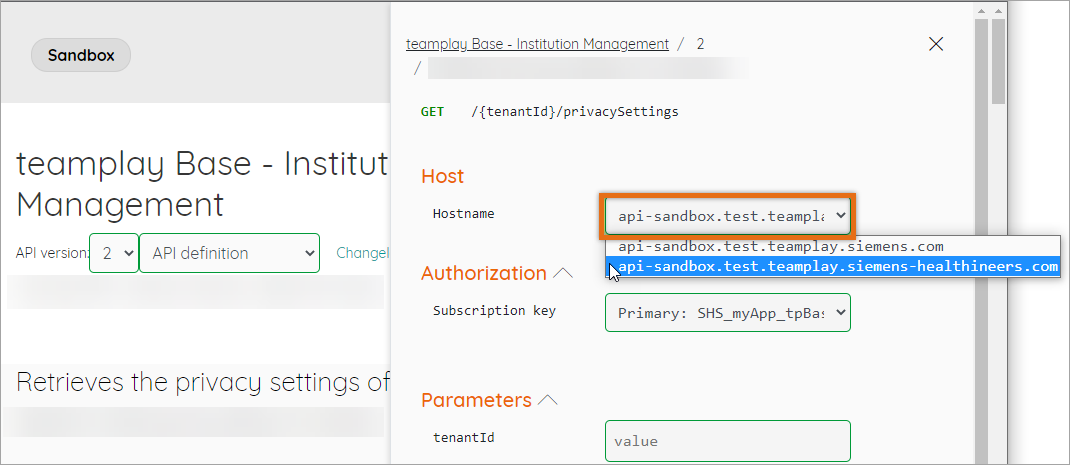
If you select the new Hostname with the new domain name, API requests are processed using the new API endpoint.
During the grace period, for each teamplay environment, in the Developer Portal, you can find the old and new environment-specific Hostname for teamplay APIs in the upper part of the Try it panel, which you can open via the Try it button on the API details page.
There will be a grace period for the old and the new client IDs. The new client IDs are only valid for the new teamplay tenants in Auth0. After the grace period, only the new client IDs will be kept and the old client IDs will be obsolete.
When registering your applications for token generation through the teamplay Base - Application Token Management API in Auth0, the API passes beyond other parameters the client ID and client secret in the response. The client ID that you received in the response must be passed with every request to generate application tokens. The client ID applies for a dedicated teamplay tenant in Auth0. With the start of the grace period, in addition to the old teamplay tenants, there will be new teamplay tenants in Auth0. Associated Auth0 APIs for the new teamplay tenants will have different request URLs containing the new domain names.
As of the start of the grace period, we strongly recommend only registering applications through the NEW request URLs (i. e. via the new Hostname). With the start of the grace period avoid registering applications still via the old API endpoints (i. e. old hosts).
Applications that have been registered in the old teamplay tenant for token generation will be automatically migrated to the new teamplay tenant by keeping the application name and the initial client secret the same.
To generate application tokens during the grace period, you have the following two options:
Generating application tokens through the OLD request URLs with the OLD client IDs for the OLD teamplay tenants in Auth0.
- OR -
Generating application tokens through the NEW request URLs with the NEW client IDs for the NEW teamplay tenants in Auth0.
It is not possible to use an old client ID to request application tokens through the new request URLs containing the new domain names.
Till the end of the grace period, you must have already migrated your code to only use the new client IDs with the new request URLs.
List my registered applications (API operation)
To look up the NEW client ID for NEW teamplay tenants in Auth0, perform the following steps:
Invoke the Developer Portal for the desired teamplay environment where you want to look up your registered applications.
Log in with your functional account that you initially have used to register your applications for token generation.
In the API gallery, navigate to the teamplay Base - Application Token Management API.
On the API details page, in the left navigation bar, select the operation List my applications that are registered for token generation.
Open the Try it panel by clicking the Try it button on the right.
On the Try it panel, from the HOST pull-down menu, select the NEW Hostname containing the string *.teamplay.siemens-healthineers.* .
Fill out all required fields as described in the description of the API operation and submit your request. At the end of the Try it panel, the API response will be displayed.
In the API response, if your request was successful, all NEW client IDs, which apply for the NEW teamplay tenant, are listed with the application name that you have specified when initially registering your application.
Example response:
[{
"name": "com.test.app",
"clientId": "000QV2LOlU7WchAbBql82HvSYr000000"
}]
With the start of the grace period, there will be additional descriptions for each operation of the teamplay Base - Application Token Management API. There you will find special information about how the operation will behave if you are still using the old or already the new request URL.
There will be a grace period for the change of the API endpoints that are associated to the new teamplay Auth0 tenants, which can be either directly consumed or indirectly through the teamplay Base - Application Token Management API.
For the start and end dates of the grace period, the same dates apply than defined for the change of the teamplay API endpoints above.
You can generate application tokens through the endpoints of the following two APIs:
teamplay Base - Application Token Management API
Auth0 API endpoints for the associated teamplay tenant.
To request application tokens, you must register your application through the teamplay Base - Application Token Management API in advance for the associated Auth0 tenant and teamplay environment.
For applications, which have been registered for the new Auth0 tenant, you can only request application tokens through the new Auth0 endpoints:
https://auth.teamplay.siemens-healthineers.cn/oauth/token (for China only)
https://auth.teamplay.siemens-healthineers.com/oauth/token (for RoW)
To keep your efforts low, before starting the grace period, we will automatically migrate your registrations from the old to the new teamplay tenants in Auth0. Due to technical limitations, the client IDs will change while the application name and the client secret will remain the same.
To generate an application token from the new API endpoints, for already migrated registrations, you have to pass the new client ID for the new teamplay tenant in Auth0 together with the client secret through your request.
During the migration of your registered applications, we automatically approve them for the new teamplay tenant. If you are still not able to generate application tokens for client IDs that apply to a new teamplay tenant, manually send us your approval request as described in the associated API documentation.
For more information on the change and how to look up the new client ID, refer to the subsection Client ID changes for generating application tokens in this article above.
AppTokenMgmt API (Multi-Domain Support) (tb-KB-i)
There will be a grace period for switching from the old to the new page URLs for the teamplay web clients. For detailed information about the upcoming changes, check the latest news in the Notification Center of your teamplay web client for the specified teamplay environment.
teamplay web client (login page, Sandbox environment)
Startup Guides - Instructions for institutions on firewall settings (Siemens Healthineers Internet article)
To open the list of news from the Notification Center, perform the following steps:
Invoke the teamplay web client (Sandbox environment) in your browser. The login page opens.
Login with your teamplay credentials. The Dashboard page opens.
From the page header, click the bell icon to display the news.
The Notification Center popup window opens and lists the latest news abstracts.
To check news on the domain name change, scroll down till the end of the Notification Center pop up window.
To see the details of a listed news abstract, click the See more button in the Notification Center popup window.

--------------- go to the top of this article --------------->>